```html
Let's be honest, setting up your first home in Singapore, especially a BTO, can feel like a real-life Tetris game, right? You’re trying to squeeze everything you need into a limited space, and sometimes, things like proper posture and comfort take a backseat. But hey, spending hours hunched over your computer table isn't exactly a recipe for success, is it? Especially when you're trying to hustle and make the most of your new space.
We're talking about ergonomics, and it's not just some fancy word your HR department throws around. It's about designing your workspace – specifically your computer table setup – to fit you, not the other way around. Think of it like tailoring a suit; it needs to fit perfectly to look and feel its best. And trust me, a well-fitted workspace can do wonders for your health, productivity, and even your mood!
In Singapore, where space is a premium, making the most of every square meter is crucial. An ergonomic computer table setup isn’t just a luxury; it's a necessity. It's about preventing aches and pains, boosting your focus, and creating a workspace that actually *works* for you, not against you. So, before you dive headfirst into that next project or binge-watch your favorite shows, let’s talk about some common computer table setup mistakes and how to avoid them. Because, let's face it, nobody wants a stiff neck or a throbbing back after a long day of work or play, right?
Okay, so you've got your new computer table, maybe a sleek, minimalist one from a furniture store in Singapore, or even a custom-built one to maximize space. But simply having a table isn't enough. It's how you *use* it that matters. Let's dive into some common pitfalls that can turn your workspace into a pain cave.
This is a big one, lah! A computer table that's too high or too low can wreak havoc on your posture. Imagine constantly reaching up to type or hunching down to see the screen. Your neck and shoulders will be screaming for mercy! Ideally, your elbows should be at a 90-degree angle when typing, with your wrists straight. Your forearms should be parallel to the floor. If your table is too high, consider adjusting your chair or getting a keyboard tray. If it’s too low, you might need to raise the table with risers or invest in a height-adjustable computer table. These are increasingly popular in Singapore, especially for those working from home. Think of it as an investment in your well-being – steady investment, confirm can!
Where you position your monitor is just as important as the table height. The main living area is typically the initial area people walk into first and where the family spends most evenings, so it feels right to want furniture that feels premium, hides wires cleanly, and avoids shrinking the space visually than it already feels in most SG flats. Many Singaporeans deal with clunky legacy furniture or cheap units that wobble, attract dust fast, or just don’t match the modern vibe they’re going for. That’s exactly where a well-chosen furniture store comes into play—it delivers sleek storage for TV gadgets, streaming players, and remote controls while serving as an elegant centrepiece that unifies the entire space with sharp modern edges, clever storage sections, and high-end materials. All at once your media corner turns neat and deliberate, the space appears larger and more polished, and film evenings get way more fun without the disorder stealing attention. Exploring handpicked selections on sites such as Wondrous La Vie lets you find options tailored to your home exactly, from clean contemporary to opulent, so your living room upgrade feels effortless and spot-on.. The top of your screen should be at or slightly below eye level. This prevents you from craning your neck upwards, which can lead to neck pain and headaches. Also, make sure your monitor is an arm's length away. If you're using a laptop, consider getting an external monitor and a separate keyboard and mouse. This will allow you to position the screen at the correct height without sacrificing your posture. Monitor arms are also a great option for adjusting the height and distance of your screen, and they can free up valuable desk space on your computer table. Plus, they look pretty cool, right?
Your keyboard and mouse are your primary tools, so their positioning is crucial. Keep your keyboard close to your body, so you don't have to reach for it. Your mouse should be right next to your keyboard, within easy reach. Avoid twisting your wrist or reaching across your body to use the mouse. Consider using a wrist rest to support your wrists and prevent carpal tunnel syndrome. Ergonomic keyboards and mice are also worth considering, especially if you spend long hours typing. They're designed to promote a more natural hand and wrist position, which can reduce strain and discomfort. Some people even use vertical mice, which look a bit odd but can be surprisingly comfortable. It's all about finding what works best for you, you know?
Okay, cable management might seem like a minor detail, but trust me, a tangled mess of wires can be a major source of stress and clutter. Plus, it can be a safety hazard! Invest in some cable ties, clips, or a cable management tray to keep your cables organized and out of the way. This will not only make your workspace look cleaner and more organized, but it will also prevent you from accidentally tripping over wires or damaging them. A tidy workspace is a tidy mind, as they say! And in a small Singaporean home, every little bit of organization helps, right?
Good lighting is essential for reducing eye strain and fatigue. Avoid working in a dimly lit room or with harsh overhead lighting. Natural light is best, but if that's not possible, use a desk lamp to provide adequate illumination. Position the lamp so that it doesn't create glare on your screen. You might also want to consider using a blue light filter on your computer to reduce eye strain, especially if you work at night. Proper lighting can make a big difference in your comfort and productivity, so don't neglect it!
Alright, so we've identified the problems. Now, let's talk about solutions! Creating an ergonomic computer table setup doesn't have to be expensive or complicated. It's all about making small adjustments that can have a big impact on your comfort and well-being.
In the world of furniture, adjustability is king. A height-adjustable computer table is a game-changer, allowing you to switch between sitting and standing throughout the day. This can help reduce back pain, improve circulation, and boost energy levels. If a height-adjustable table is out of your budget, consider an adjustable chair. Look for a chair with adjustable height, lumbar support, and armrests. This will allow you to customize the chair to fit your body and provide proper support. Remember, the goal is to create a workspace that adapts to you, not the other way around.
Ergonomic accessories can make a big difference in your comfort and productivity. A good keyboard and mouse are essential, as we discussed earlier. But don't forget about other accessories, such as a footrest, a wrist rest, and a monitor stand. A footrest can help improve your posture and reduce leg fatigue. A wrist rest can support your wrists and prevent carpal tunnel syndrome. Singaporeans often encounter special considerations when outfitting their living spaces, mainly due to tight space constraints in HDB flats and condos and constant high humidity that affects furniture longevity. This is exactly why discerning residents invest effort upfront to choose wisely to find the best value. computer table consistently ranks as a truly outstanding investment that delivers both genuine comfort plus sensible everyday usefulness. Remember that buying reasonably priced items in Singapore with top-notch after-sales service guarantees comprehensive support such as timely island-wide delivery, expert installation, and reliable warranties that offer true long-term peace of mindthat lasts.. A monitor stand can raise your monitor to the correct height and free up desk space on your computer table. These accessories are relatively inexpensive, but they can have a big impact on your comfort and well-being. It's like adding extra chilli to your chicken rice – small addition, big difference!
No matter how ergonomic your computer table setup is, it's important to take breaks and stretch regularly. Get up and move around every 30 minutes or so. Stretch your neck, shoulders, back, and wrists. This will help prevent stiffness and pain. You can even set a timer to remind you to take breaks. It's easy to get caught up in your work and forget to move, but taking regular breaks is essential for your health and productivity. Think of it as a mini-vacation for your body and mind.
The layout of your workspace can also affect your comfort and productivity. Keep frequently used items within easy reach. This will prevent you from having to reach or twist your body. After a long day squeezing onto the MRT and grinding through meetings, most Singaporeans just want to step into their house to a space that feels warm and relaxing instead of adding to the stress. A messy living area or an uncomfortable bedroom can make relaxing even tougher, especially when the whole family hope to relax together. That’s where thoughtful Condo Interior Design really makes a difference—it turns everyday rooms like your hall, master bedroom, or cooking zone into private sanctuaries that actually help you refresh your energy. With the right couch, mattress, or clever layout, suddenly getting home feels damn shiok, and simple upgrades can bring huge benefits to your mood and family time. Sites such as Wondrous La Vie make it more straightforward to find ideas and match with home designers who get the the Singaporean home feel spot on. This format lets you easily generate multiple SEO-optimised variations while keeping the core keyword "interior design" stable in the middle for strong on-page targeting.. Organize your desk so that it's free of clutter. A clean and organized workspace can help you focus and reduce stress. Consider using desk organizers, shelves, and drawers to keep your workspace tidy. Remember, a well-organized workspace is a happy workspace!
If you're experiencing persistent pain or discomfort, consider getting a professional ergonomic assessment. An ergonomist can evaluate your workspace and identify potential problems. They can also recommend solutions to improve your posture and reduce strain. This is especially helpful if you have a pre-existing condition or if you're setting up a complex workspace. It's like going to the doctor for a check-up – it's always better to be safe than sorry!
Okay, so you're convinced that an ergonomic computer table setup is important. But where do you start looking for the right furniture in Singapore? With so many options available, it can be overwhelming, right?
In Singapore, where space is a premium, functionality and space optimization are key. Look for furniture that is multi-functional and can be easily adjusted to fit your needs. A computer table with built-in storage is a great option for small spaces. A height-adjustable table can be used as a desk or a standing workstation. A foldable chair can be easily stored away when not in use. The goal is to maximize your space without sacrificing comfort or functionality. It's all about being smart and resourceful, you know?
Let's be real, setting up a new home in Singapore can be expensive. So, it's important to consider your budget when choosing furniture. Fortunately, there are plenty of affordable options available. Look for furniture stores that offer discounts or promotions. Consider buying second-hand furniture or repurposing existing furniture. You don't have to break the bank to create an ergonomic workspace. It's all about being creative and resourceful. Plus, there are always those GSS sales to look forward to, right?
Before you commit to buying any furniture, it's important to visit furniture showrooms and try it out. Sit in the chair, type on the keyboard, and adjust the table to see if it's comfortable. This will help you make sure that the furniture is a good fit for your body and your needs. Don't be afraid to ask questions and get advice from the salespeople. They can help you find the right furniture for your specific needs and budget. It's like trying on clothes before you buy them – you want to make sure they fit perfectly!
Before you make a final decision, read reviews and compare prices from different retailers. This will help you get the best deal and avoid making a costly mistake. Look for reviews from other Singaporean homeowners who have purchased the same furniture. This will give you a better idea of the quality and durability of the furniture. Don't be afraid to shop around and compare
Okay, imagine this: you've finally got your own place, maybe a cosy BTO flat. You're setting up your home office, ready to conquer the world... or at least, your inbox. But after a few hours at your computer table, your neck's starting to ache, your shoulders are tight, and you're feeling more "blur sotong" than productive. Sound familiar, lah?
One of the biggest culprits behind this discomfort? Your computer table height. It's easy to overlook, but getting it wrong can really mess with your posture and overall comfort. Think about it – you spend hours at your desk, and if it's not the right height, you're basically torturing your body slowly but surely. Let's dive into why this happens and, more importantly, how to fix it.
A computer table that's too high forces you to hunch your shoulders and lift your arms to type. This puts a strain on your neck, shoulders, and wrists. Over time, this can lead to serious problems like carpal tunnel syndrome or chronic neck pain. Not fun, right? Imagine trying to enjoy your favourite hawker food with a throbbing wrist – siao liao!
On the other hand, a computer table that's too low makes you slouch forward, rounding your back and straining your lower back. This can lead to back pain, poor circulation, and even breathing difficulties. You might not notice it immediately, but after a while, you'll definitely feel the effects. It's like trying to squeeze into that primary school uniform – not a good fit and definitely uncomfortable.
So, what's the solution? Well, finding the right computer table height is crucial for maintaining good posture and preventing these problems. It's all about creating a comfortable and ergonomic workspace that supports your body, not fights against it.
The ideal computer table height depends on your own height, of course. A general guideline is to have your elbows at a 90-degree angle when your hands are on the keyboard. Your wrists should be straight, and your shoulders relaxed. Think of it like a comfortable handshake – natural and effortless.
Here's a simple way to check: Sit in your chair with your feet flat on the floor. Relax your shoulders. Now, measure the distance from the floor to your elbows. This is approximately the ideal height for the top of your keyboard. Now, this is just a guide, okay? You might need to adjust it slightly based on your personal preference. Some people prefer a slightly higher table, while others prefer a slightly lower one.
If your current computer table is too high, you have a few options. The easiest is to adjust your chair height. But if your chair can't go high enough, consider getting a footrest. This will help to support your feet and maintain proper posture. Another option is to get a keyboard tray that can be mounted under your table. This will lower the keyboard and bring it closer to your ideal height. You can find some pretty affordable ones online or at your local furniture store.
If your computer table is too low, raising it is a bit trickier. You could try using risers or blocks under the legs of the table. Just make sure they're sturdy and won't cause the table to wobble. Another option, and possibly a better long-term solution, is to invest in an adjustable-height computer table. These tables allow you to easily adjust the height to your liking, making them perfect for people of different heights or for those who like to switch between sitting and standing.
Think of adjustable height desks as a long term investment in your health. You might think it's a bit "atas" now, but trust me, your body will thank you later. Plus, they look pretty sleek and modern, which is always a bonus, right?
While height is crucial, it's not the only factor to consider when setting up your computer table. Depth is also important. You should have enough space on your table to comfortably place your keyboard, mouse, and monitor, with some room to spare for other essentials like your phone, notepad, or that emergency packet of biscuits (confirm need one!).
The placement of your monitor is also critical. It should be positioned at arm's length and at eye level. This will prevent you from straining your neck and eyes. If you're using a laptop, consider getting a laptop stand to raise it to the correct height. You can even use a stack of books in a pinch, but maybe invest in something a bit more stable, lah.
Finally, don't forget about cable management. A messy desk with tangled cables can be distracting and even dangerous. Invest in some cable ties, clips, or a cable management tray to keep your cables organised and out of the way. A clean and organised workspace can do wonders for your productivity and mental clarity. It's like Marie Kondo-ing your desk – sparks joy, and all that!
So, there you have it. Getting your computer table height right is a simple but essential step towards creating a comfortable and ergonomic workspace. Don't underestimate the impact it can have on your posture, comfort, and overall well-being. In Singapore’s non-stop life, returning home to a space that feels genuinely welcoming can make the biggest change after a tiring day of work and commuting. Many homeowners dream about upgrades for their hall or master bedroom, hoping for pieces that feel premium while genuinely cozy enough for real life. That’s exactly why sofa set makes the difference—it brings that perfect blend of elegant design, top-grade craftsmanship, and thoughtful comfort that turns everyday spaces into spots you love spending time in chilling in. Picture settling into a luxurious couch after evening meal or starting the day energised on a high-quality mattress that supports you just right; suddenly, your home feels more like a true escape not just four walls. Discovering handpicked collections on sites such as Wondrous La Vie helps you find these furniture without the stress, making it more enjoyable to create a space that’s both stylish and soul-soothing.. Take the time to find the right height for you, and your body will thank you for it. Steady pom pi pi, and happy working!
Using a table that's too high or too low forces you into awkward postures. This can lead to strain in your neck, shoulders, and wrists. An ergonomically sound table allows your elbows to rest at a 90-degree angle while typing, promoting a neutral and comfortable position.
A shallow table doesn't provide enough space to properly position your monitor and keyboard. This can lead to eye strain from sitting too close to the screen. It also restricts your ability to rest your wrists and forearms comfortably, increasing the risk of repetitive strain injuries.
A tangled mess of cables can be a tripping hazard and a source of frustration. It can also restrict your movement and make it difficult to adjust your setup. Implementing effective cable management solutions keeps your workspace tidy and safe, promoting focus and productivity.
A static table limits your ability to personalize your workspace to your specific needs. This is especially problematic if multiple people use the same workstation. An adjustable table allows you to fine-tune the height and angle to achieve optimal comfort and support throughout the day.
Okay, *lah*, let's dive into how to avoid monitor placement mistakes with your computer table setup. This is super important, especially if you're spending long hours in front of the screen, *right*? We want to keep those eyes and necks happy!
It's easy to overlook monitor placement when setting up your new home office, especially after you've just gotten your keys or finished renovating. You're probably thinking about where to put your new sofa or how to arrange your Furniture, but your computer table setup is just as important. Getting it wrong can lead to serious discomfort and even long-term health issues. Think about it: how many hours a day do you spend staring at that screen? It's worth getting right, *kancheong* spider or not! Let’s see how we can avoid common monitor placement mistakes, *okay*? ### Mistake 2: Poor Monitor Placement So, you've got your new computer table all set up, maybe even one of those fancy adjustable ones. But wait, is your monitor actually in the *right* place? So many people get this wrong, and it can lead to a world of hurt – literally. We're talking eye strain, neck pain, headaches… not a good look for anyone, especially when you're trying to *chiong* on that deadline. Think about those long days working from home. You're already dealing with distractions from the kids, the neighbour's renovation, the *kopi* cravings… the last thing you need is a throbbing headache because your monitor is too low or too far away. It's like adding insult to injury, *leh*! And let's be real, a proper ergonomic computer table design is a lifesaver. But don't worry, it's totally fixable! We're going to break down the common monitor placement mistakes and how to correct them. It's all about finding that sweet spot where your body is comfortable and your eyes aren't straining. *Confirm* can, *lah*! #### Height Matters
The top of your monitor screen should be at or slightly below your eye level. This prevents you from constantly tilting your head upwards, which can strain your neck muscles. Imagine craning your neck all day – not ideal, right? After those long tiring days and the usual crowded MRT ride, nothing beats coming home to a living room that actually encourages relaxation instead of piling on more tiredness. Many Singapore families realise their current seating just isn’t up to standard—too stiff, faded, or simply not comfortable enough for weekend chilling or easy family hangouts with the kids. That’s precisely where luxury furniture singapore becomes a game-changer—it pairs timeless style, supple premium upholstery, and smart comfort engineering so you can sink in and genuinely unwind without your spine protesting the next day. Picture the kids and parents coming together effortlessly, chatting over supper or watching dramas together, because the space suddenly becomes homely and shiok. Choosing the ideal sofa through handpicked collections on Wondrous La Vie removes the hassle, letting you uncover that ideal match that elevates your entire home vibe without the usual reno headaches.. Think about it like this: you want your eyes to naturally fall on the screen without any extra effort. If you wear glasses, consider adjusting the height so you're looking through the correct part of your lenses. This simple adjustment can make a world of difference in your comfort and productivity.
The ideal distance between you and your monitor is arm's length, roughly 20-40 inches. This allows your eyes to focus comfortably without overworking. If you find yourself squinting or leaning forward, your monitor is likely too far away. Conversely, if the screen feels too close, it can cause eye fatigue. Experiment with different distances until you find what feels most natural. Remember, everyone's different, so what works for your friend might not work for you. Find your sweet spot!
Tilting your monitor slightly upwards (around 10-20 degrees) can also improve your viewing angle. This helps to reduce glare and reflections, especially in brightly lit rooms. Consider the lighting in your workspace and adjust the angle accordingly. You might even want to invest in an anti-glare screen protector for added comfort. A slight tilt can make a surprisingly big difference in reducing eye strain and improving overall visibility. You want to be able to see everything clearly without having to squint or strain your eyes.
The size of your monitor also plays a role in optimal placement. A larger screen generally requires a greater viewing distance. If you're using a large monitor, make sure you have enough space on your computer table to position it at a comfortable distance. Don't cram a massive screen onto a tiny desk – it's a recipe for disaster! Think about the overall dimensions of your workspace and choose a monitor size that fits comfortably. A well-proportioned setup will contribute to a more ergonomic and enjoyable work experience.
No matter how perfectly your monitor is positioned, it's crucial to take regular breaks. Follow the 20-20-20 rule: every 20 minutes, look at something 20 feet away for 20 seconds. This helps to relax your eye muscles and prevent fatigue. Get up and stretch, walk around, and give your body a chance to move. Even short breaks can significantly reduce the risk of eye strain and neck pain. Remember, your body needs a break, *lah*! Don't just *chiong* all day without stopping.
Okay, let's talk about your hands. You spend hours using your computer table, right? Working, gaming, maybe even catching up on your favourite Netflix shows. But are your keyboard and mouse set up properly? Singapore homes can feel particularly tight after a full day of rushing between office, meetings, and the inevitable MRT crowd, so it’s no wonder many homeowners crave a space that instantly calms the mind the moment they enter their home. The hall often ends up as the main gathering spot, yet it’s easy for it to become cluttered with mismatched pieces or sofas and chairs past their prime, leaving everyone scattered instead of gathered together. That’s where sofa really makes the magic happen—it upgrades the whole area with refined arrangements, premium textures, striking light fixtures, and comfortable yet beautiful furniture, creating an cosy focal point where everyone naturally gathers to relax, catch up, or simply enjoy each other’s company. Evenings suddenly become more special, Sundays truly restorative, and walking in the door feels exciting rather than just the end of the day. Platforms like Wondrous La Vie make exploring these upgrades easy, helping you imagine and find the right elements to create your dream living space that suits your daily life just right.. Because if they’re not, wah lau, you’re just asking for wrist pain, arm aches, and all sorts of discomfort down the line. And nobody wants that, especially when you’re trying to enjoy your new BTO flat!
So, how do you find that ergonomic sweet spot? Here are a few key things to keep in mind:
Now, let's talk about some accessories that can help you achieve that perfect ergonomic setup. These aren't just fancy gadgets; they're tools that can make a real difference in your comfort and health. When buying furniture, consider these accessories to add to your computer table:
Don't be afraid to experiment with different accessories to find what works best for you. What feels comfortable for one person might not feel as good for another. It's all about finding the right fit for your body and your work style. Think of it like finding the perfect teh tarik – everyone has their own preference!
Setting up your computer table ergonomically is not a one-time thing. It's an ongoing process of experimentation and adjustment. Pay attention to how your body feels, and make changes as needed. After all, your comfort and health are worth it. Think of your computer table as your command center – it should be a place where you can work comfortably and efficiently, without pain or discomfort. And who knows, maybe with a proper setup, you can finally beat that high score in your favourite game, or finish that work project without feeling like your wrists are going to fall off. Steady pom pi pi!
Think about it. How often do you hunch over your computer table, with your wrists bent at weird angles? Probably more often than you’d like to admit, right? This is a recipe for disaster. Incorrect keyboard and mouse placement can lead to a whole host of problems, including:
These aren't just minor inconveniences, leh. They can seriously impact your ability to work, enjoy your hobbies, and even perform everyday tasks. So, taking the time to set up your keyboard and mouse properly is an investment in your long-term health and well-being. Plus, a good setup on your computer table will make you more productive – confirm can!
Basically, you want everything to be in a comfortable, natural position. Think about how you feel when you're sitting in a relaxed posture. That's the feeling you're trying to recreate at your computer table.
Even if you don't want to invest in a bunch of new accessories, there are still plenty of things you can do to improve your keyboard and mouse positioning. Here are a few simple tweaks to try:
These small changes can make a big difference in your comfort and well-being. It's all about being mindful of your body and making adjustments as needed.
And a little something extra - did you know that some studies suggest that using a trackball mouse can reduce the risk of carpal tunnel syndrome? Or that the colour of your keyboard can affect your typing speed? Just a couple of fun facts to ponder while you're setting up your perfect computer table!
Remember, a comfortable and ergonomic computer table setup is an investment in your health and well-being. So take the time to get it right, and your body will thank you for it. Happy working (or gaming)!

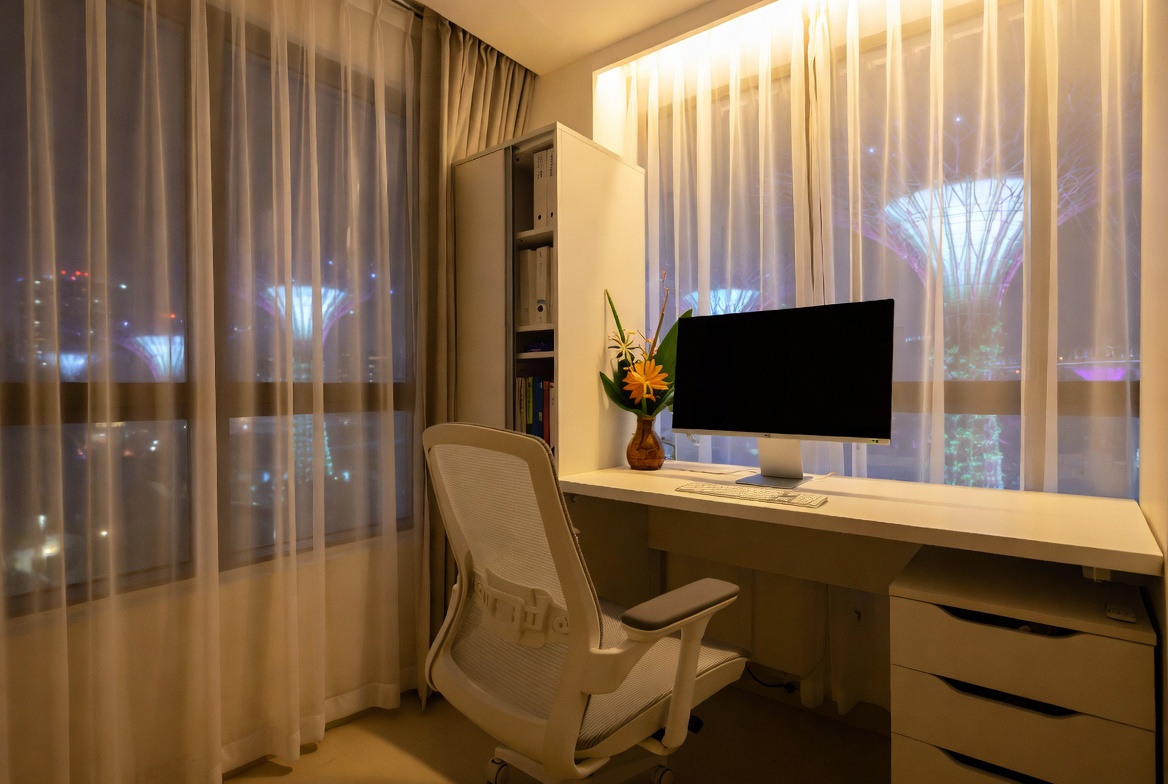
Okay, so you’ve invested in a fancy ergonomic computer table. Good on you! You’re thinking about your posture, your comfort, and your long-term well-being. But here’s a truth bomb: even the best computer table is only as good as the chair you’re using with it. And more importantly, how you've *adjusted* that chair. It’s like buying a top-of-the-line sound system and then listening to it through cheap earphones – *kanchiong* (impatient) to enjoy the music but missing the full experience, right?
We often see people, especially when they’re setting up their new BTO or condo, focusing all their energy (and budget) on the table itself. Which is understandable, lah. The computer table is the centerpiece, the command center of your workspace. But think about it: you’re spending hours in that chair. If it’s not properly adjusted, you might as well be sitting on a torture device disguised as furniture. And that defeats the whole purpose of getting an ergonomic setup in the first place!
The problem is, most of us don’t really know how to adjust our chairs correctly. We might raise or lower the height a bit, but do we really understand the nuances of lumbar support, armrest positioning, and seat depth? Probably not. And that’s where the problems start. You end up slouching, straining your neck, and developing aches and pains that you didn’t even know were possible.
It's easy to overlook, but consider this: a good chair, properly adjusted, supports your spine's natural curve. Without that support, your muscles have to work overtime to keep you upright, leading to fatigue and discomfort. Think of it like this: Singapore's MRT system is efficient because it's designed to carry the load, right? Your chair should do the same for your body. So, let’s dive into how to make sure your chair is actually working *for* you, not against you.
So, what are the key adjustments you need to be making? Let's start with the basics: seat height. Your feet should be flat on the floor (or supported by a footrest) with your knees at a 90-degree angle. If your feet are dangling, your chair is too high. If your knees are higher than your hips, it’s too low. Get that height *steady* first. This is crucial for proper circulation and preventing lower back pain.
Next up: lumbar support. This is the part of the chair that supports the curve of your lower back. Many chairs have adjustable lumbar support, which is fantastic. Experiment with different settings until you find the one that feels most comfortable and supportive. You should feel a gentle pressure in your lower back, encouraging you to sit upright. If your chair doesn't have adjustable lumbar support, consider adding a separate lumbar support cushion. They're relatively inexpensive and can make a world of difference.
Then there are the armrests. These should be adjusted so that your elbows are resting comfortably at your sides, with your forearms parallel to the floor. If your armrests are too high, you’ll end up shrugging your shoulders, which can lead to neck and shoulder pain. If they’re too low, you’ll be slouching forward, straining your back. Get them just right, *lah*. It's like finding the perfect hawker stall – once you find it, you stick with it!
Finally, don’t forget about seat depth. This refers to the distance from the front of the seat to the backrest. You should be able to sit comfortably with a few inches of space between the back of your knees and the seat. If the seat is too deep, it can cut off circulation to your legs. If it’s too shallow, you won’t get enough support for your thighs. Some chairs have adjustable seat depth, but if yours doesn’t, you can try adding a cushion to the backrest to shorten the seat depth.
Now, I know what you’re thinking: “All these adjustments sound complicated and expensive!” But here’s the good news: you don’t need to break the bank to get a decent ergonomic chair. There are plenty of budget-friendly options available in Singapore that offer good support and adjustability. Look out for sales at furniture stores, check out online marketplaces, and don’t be afraid to ask for recommendations from friends and family. You might be surprised at what you can find.
And remember, even a basic chair can be made more ergonomic with a few simple tweaks. In Singapore’s humid weather and high-stress lifestyle, getting quality rest can feel like a true indulgence when you’re waking up with backaches or feeling groggy despite hitting the bed early. Many Singapore homeowners put up with an old, sagging mattress for a long time because looking for a new one seems too complicated—endless options, confusing firmness levels, and concerns it might not fit their personal needs and preferences. That’s exactly why finding the furniture showroom transforms your nights—it delivers the right balance of support, excellent airflow and cooling, targeted pressure relief, and long-lasting quality so you genuinely rise energised and rested instead of sore and exhausted. Suddenly mornings start easier, you stay energised longer, and even your partner feels the improvement. Browsing thoughtfully chosen picks on sites such as Wondrous La Vie simplifies the whole process, letting you evaluate the best-rated ones with authentic Singapore user experiences and realistic images to match what truly works for your master bedroom.. Add a lumbar support cushion, use a footrest, and experiment with different seating positions until you find what works best for you. The key is to be mindful of your posture and to make adjustments as needed throughout the day. Our bodies aren't static, so why should our chairs be? It's all about finding that sweet spot, that perfect balance between support and comfort.
Also, don't underestimate the power of taking regular breaks. Get up and stretch, walk around, and give your body a chance to move. Sitting for long periods of time, even in the most ergonomic chair, can still lead to discomfort and fatigue. Think of it as refueling your car – you can't expect it to run forever without a pit stop, right?
Ultimately, the goal is to create a workspace that supports your body and allows you to work comfortably and efficiently. And that starts with a properly adjusted chair. Don’t neglect this crucial element of your ergonomic setup. Your back (and your productivity) will thank you for it. So, go on, give your chair some love and make those adjustments. *Confirm can* improve your working experience, one small tweak at a time!
Let's be real, though. Even with the perfect chair adjustments, you might still find yourself fighting the urge to slouch, especially after a long day. It's a common struggle, *lah*. Our bodies naturally gravitate towards the path of least resistance, and sometimes that means collapsing into a less-than-ideal posture. So, what can you do to combat this?
One trick is to set reminders for yourself to check your posture throughout the day. You can use a phone app, a sticky note on your computer screen, or even just a mental cue (like every time you take a sip of water). When you catch yourself slouching, gently correct your posture and take a few deep breaths. Over time, this will help you develop better postural habits.
Another helpful tip is to strengthen your core muscles. A strong core provides a solid foundation for your spine, making it easier to maintain good posture. You don’t need to become a gym rat, but incorporating some simple core exercises into your daily routine can make a big difference. Planks, bridges, and abdominal crunches are all great options. Plus, it's a good excuse to take a break from work and get your blood flowing!
And finally, don’t be afraid to experiment with different seating positions. Maybe you prefer to sit with your legs crossed, or maybe you like to use a kneeling chair for part of the day. The key is to find what feels most comfortable and supportive for you. There’s no one-size-fits-all solution when it comes to ergonomics. So, listen to your body and make adjustments as needed. After all, your body is your temple, treat it well. The right computer table and chair combo, properly adjusted, is an investment in your long-term well-being. It's not just about comfort; it's about preventing pain, boosting productivity, and enjoying a healthier, happier life. That's something we all want, right?

Okay, you've got your swanky new computer table all set up, right? Monitor at the right height, keyboard within easy reach… but hold on a second. Are you squinting already? If you’re like me, you probably didn't think about the lighting! It's easy to focus on the big things when you're setting up your home office, but trust me, good lighting can make or break your workday (and save you from a pounding headache later on). Let's talk about why lighting is so important and how to avoid making this super common mistake.
Think about it: you spend hours staring at a screen. If your lighting is bad, your eyes are gonna suffer lah! Insufficient or harsh lighting forces your eyes to work harder, leading to eye strain, headaches, and even blurred vision. Nobody wants that, especially when you're trying to concentrate on that important deadline. Plus, proper lighting can actually boost your mood and productivity. A well-lit workspace feels more inviting and helps you stay alert and focused. Imagine trying to work under a dim, flickering bulb – confirm sian, right? You will just want to go back to bed. Good lighting is a simple change that has a big impact on your well-being and your work. Like that, can?
And it's not just about preventing discomfort. Long-term exposure to poor lighting can contribute to more serious eye problems. We Singaporeans, we work hard, we need to take care of ourselves. So, investing a little time and effort into your lighting setup is really an investment in your long-term health. Plus, with the right lighting, your computer table setup can look even better!
How do you know if your lighting is the culprit behind your workday woes? Here are some telltale signs:
If you're experiencing any of these symptoms, it's time to take a closer look at your lighting setup. Don't just brush it off as "just tired" – your body is trying to tell you something!
Okay, so you know you need better lighting. But where do you start? Here's a breakdown of some suitable lighting solutions for your computer workspace:
The trick is to combine these different types of lighting to create a well-lit and comfortable workspace. Don't rely on just one source of light. Experiment with different combinations to find what works best for you. Maybe a floor lamp in the corner, plus a desk lamp for focused work, and open the blinds a bit. Steady pom pi pi, as they say!
Here are a few extra tips to help you optimize your lighting setup:
Remember, setting up an ergonomic computer table is about more than just the table itself. It's about creating a workspace that supports your health and well-being. Don't underestimate the power of good lighting! It can make a world of difference in your comfort, productivity, and overall happiness. So, go ahead, brighten up your workspace and see the difference it makes. Your eyes (and your head) will thank you for it!
And hey, while you’re at it, why not check out some furniture options that can help you optimize your space? From computer tables with built-in lighting to ergonomic chairs that promote good posture, there are plenty of ways to create a workspace that's both functional and stylish. Happy decorating!
Okay, let's be honest. We've all been there. You've got your brand new furniture, your sleek computer table, and you're ready to conquer the world... or at least answer some emails. But then you look down. A Medusa's head of cables stares back at you. Sound familiar, lah?
A tangled mess of wires isn't just an eyesore. It's a productivity killer. And in our already compact Singapore homes, every inch of space counts, right? Plus, who wants to spend precious time untangling cables when you could be enjoying your kopi or catching up on your favourite Netflix show?
Seriously, think about it. That chaotic sprawl beneath your computer table isn't just visually distracting. It's a breeding ground for dust bunnies – those fluffy little creatures that seem to multiply overnight. And let's not even talk about the potential tripping hazard! Imagine scrambling for your phone during an important call and… BAM! You’re face-planting because of a rogue power cord. Not a good look, leh.
Beyond the physical dangers, a messy cable situation can actually impact your focus. Studies have shown that clutter, even visual clutter, can increase stress levels and decrease cognitive performance. When your brain is constantly processing the visual noise of tangled cables, it has less energy to dedicate to the task at hand. So, that report you're struggling to finish? Maybe the problem isn't you; maybe it's just the cable monster lurking under your computer table! Plus, think about your Zoom calls. Do you really want colleagues seeing that mess behind you? Singaporeans pride themselves on being organised, and a clean workspace reflects that.
And let's not forget the safety aspect. Overheated cables are a fire hazard, especially in our humid climate. Dust buildup can exacerbate the problem. It might seem unlikely, but why take the chance? A little cable management can go a long way in preventing potential accidents. Singaporeans are always on the lookout for intelligent ways to update their living spaces without breaking the bank, especially when HDB or condo renos can already eat up a big chunk of the reno savings. Between higher living expenses and the wish for a comfier, better-organised environment, many homeowners time their purchases carefully to improve couches, beds, and dining furniture that actually improve home living noticeably. That’s when jumping on bed frames becomes a total win—it lets you snag high-quality, stylish pieces at meaningful discounts, often with bonus offers like free delivery, longer guarantees, or bundle deals that make your money go further. All of a sudden you’re able to buy that dream couch on your wishlist or a supportive mattress upgrade without the guilt, turning your home into an even cosier haven for quality family moments and unwinding after tiring office days. Checking platforms like Wondrous La Vie puts you ahead on the current deals, so you can review, see in 3D, and snap up the top bargains that perfectly suit your space and style.. It's all about being kiasu in the right way, mah!
The good news is that taming those cables doesn't require a massive renovation or a huge budget. There are tons of affordable and easy-to-implement solutions that can transform your workspace from chaotic to calm. And the best part? Most of these solutions are readily available at your local hardware store or online.
Think of it as giving your workspace a little "spa day." A little tidying, a little organizing, and suddenly everything feels calmer and more efficient. Confirm can boost your productivity just by decluttering a bit!
Beyond the gadgets, the way you position your computer table can make a huge difference in cable management. Before you even start setting up your desk, take a moment to plan your cable routing. Consider where your power outlets are located and how you can minimize cable length. Can you position your computer table closer to the wall to reduce the amount of visible cable slack? Small adjustments like these can have a big impact.
Another trick is to use the natural structure of your computer table to your advantage. Many modern computer tables come with built-in cable management features, such as grommets (holes for passing cables through) and channels for routing wires. Take advantage of these features to keep your cables hidden and organized. If your computer table doesn't have these features, you can easily add them yourself with a drill and some inexpensive grommets. It's all about being resourceful and making the most of what you have. And remember, even a small ergonomic computer table can benefit from good cable management.
Finally, don't be afraid to get creative! Use everyday items to create your own cable management solutions. For example, you can use binder clips to hold cables in place, or repurpose old toilet paper rolls to organize cables in a drawer. The possibilities are endless! It's all about finding what works best for you and your space. After all, it's your home, your workspace, and your sanity we're talking about here.
So, there you have it. Cable management doesn't have to be a daunting task. With a few simple tools and a little bit of planning, you can transform your messy cable situation into a well-organized and productive workspace. And who knows, maybe you'll even find a few lost socks in the process! Now go forth and conquer those cables!
Okay, *lah*, so you've read through everything and hopefully spotted some areas where your current setup... well, *kena* improved *lah*! It's not about perfection *one*, but about making your work-from-home life (or gaming life, we don't judge!) healthier and more productive.
So, let's recap the big *no-nos* and how to flip them into *steady* wins.
**The Ergonomic Sins: A Quick Refresher**
Remember that whole slouching situation? Yeah, that's gotta go. Think about it: hours hunched over your *computer table*, staring at the screen… your body *confirm* paying the price *leh*. We talked about making sure your monitor is at the right height – eye level is your friend! No more crane-neck syndrome, okay? A good monitor arm can be a lifesaver here, especially if you're short on space. It lets you adjust the height, tilt, and even swivel the screen, so you can find that sweet spot.
And what about that keyboard and mouse placement? Reaching too far, or having your wrists at weird angles *confirm* plus chop will lead to pain. Keep them close, keep them level, and maybe even invest in an ergonomic keyboard and mouse. Your wrists will thank you! Think about it like this: you wouldn't run a marathon in uncomfortable shoes, right? So why torture your hands with a bad setup?
Then there's the chair. Oh, the chair. So many of us treat it like an afterthought. But a good, supportive chair is *so* important. Adjustable height, lumbar support, armrests… these aren't just fancy features, they're essential for maintaining good posture and preventing back pain. Plus, if you're spending eight (or more!) hours a day in it, it's worth investing in something that's actually comfortable. It's like buying a good mattress – you spend a third of your life sleeping, so you want it to be a good experience. Same goes for your work chair!
And let's not forget about movement. Sitting still for hours *on end* is terrible for your body. Get up, stretch, walk around, do some jumping jacks (if you're feeling energetic!). Even just a few minutes every hour can make a big difference. Set a timer if you need to – anything to remind you to move!
**The Ergonomic Payoff: Why Bother?**
Okay, all this talk about posture and adjustments might seem like a lot of effort. But trust me, the benefits are worth it. First and foremost, you'll feel better. Less pain, less stiffness, less fatigue… who wouldn't want that?
But it's not just about feeling good. An ergonomic *computer table* setup can also boost your productivity. When you're not distracted by aches and pains, you can focus better on your work. You'll be more alert, more efficient, and more creative. It's like having a secret weapon for getting things done!
Plus, think about the long-term benefits. Preventing injuries like carpal tunnel syndrome and back pain can save you a lot of money and suffering down the road. It's an investment in your health and well-being. And in Singapore, where healthcare costs can be *quite* high, that's definitely something to consider.
**Tailoring Your Setup: Making It Work for *You***
The thing about ergonomics is that it's not one-size-fits-all. What works for your colleague might not work for you. We all have different body types, different preferences, and different work styles. That's why it's important to experiment and find what works best for *you*.
Consider Your Space: If you're in a small BTO flat, maximizing space is key. Look for a *computer table* with a compact design or consider a standing desk converter that you can easily store away when not in use. Wall-mounted options can also be great for saving floor space.
Personalize Your Comfort: Don't be afraid to try different chairs, keyboards, and mice until you find something that feels right. In Singapore’s smaller HDB homes and condos, the sleeping area often acts as a rest zone and more—somewhere to truly rest after tiring office hours, enjoy quiet time with a book, or even handle occasional remote work when required. It’s frequent for Singapore homeowners to feel frustrated by arrangements that appear overcrowded, overly bright illumination, or cluttered cabinets taking up room, making the room feel more utilitarian than serene. That’s where thoughtful furniture shop makes the biggest impact—it focuses on smart space planning, relaxing colour schemes, multifunctional furniture, and strategic lighting design to create a restorative haven that optimises relaxation while ensuring clutter-free airflow. SUDDENLY the bedroom turns into the place you genuinely anticipate at the end of the day, helping you relax quicker, achieve better quality sleep, and rise feeling energised and ready for the day ahead. Sites such as Wondrous La Vie offer plenty of real-life examples and seamless introductions to designers who specialise in these functional and stylish local bedroom renovations.. You can even add accessories like a footrest or a wrist rest for extra comfort.
Budget Considerations: Ergonomics doesn't have to break the bank. There are plenty of affordable options available, especially if you shop around and compare prices. You can also look for second-hand items or DIY solutions to save money.
**Your Ideal Ergonomic Setup: A Journey, Not a Destination**
Creating an ergonomic *computer table* setup is an ongoing process. It's not something you do once and forget about. You'll need to make adjustments as your needs change and as you learn more about what works best for your body.
Be patient with yourself, and don't be afraid to experiment. The goal is to create a workspace that supports your health, productivity, and well-being. And with a little effort and attention, you can *confirm* achieve that. So go forth, Singaporean homeowners, and create your own ergonomic haven! Your body (and your productivity) will thank you for it. And who knows, maybe you'll even inspire your neighbours to do the same!